
Easy Pay lets brands quickly send one-off payments to creators whom they have worked with in the past —without building a full project. This feature is designed to simplify fast, lightweight transactions for teams that need to pay trusted creators right away.
Note: Easy Pay is a feature that is only available to Glimmer subscribers. If you are interested in this feature, please reach out to sales@glimmer.io.
What is Easy Pay?
Easy Pay is a streamlined payment option that allows brands to make a single payment to a creator. This is only available for creators that brands have previously worked with. Unlike a typical project, no star ratings, reviews, or feedback is collected. This feature helps teams issue quicker payments while avoiding the overhead of producing a full project brief. It’s important to note that creators will still need to approve any projects that are submitted for Easy Pay - these projects will already be considered complete on your end but payment will not be rendered until the creator confirms it.
How to Use Easy Pay
Easy pay is as simple as it sounds. In order to initiate an easy pay, navigate to your Completed Projects page by selecting Projects > Projects. Select the Completed tab to view your completed projects, and click the ellipsis (three dot) menu. From there you will see the drop down that will give you the option to select Easy Pay.
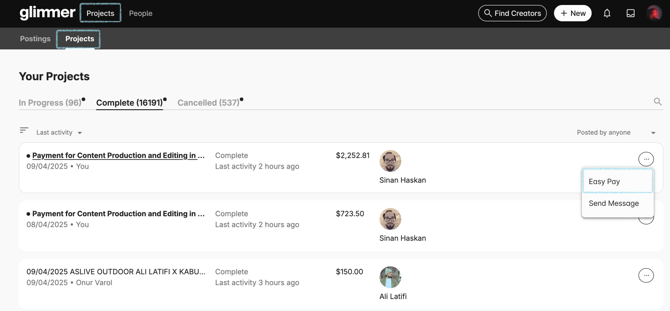
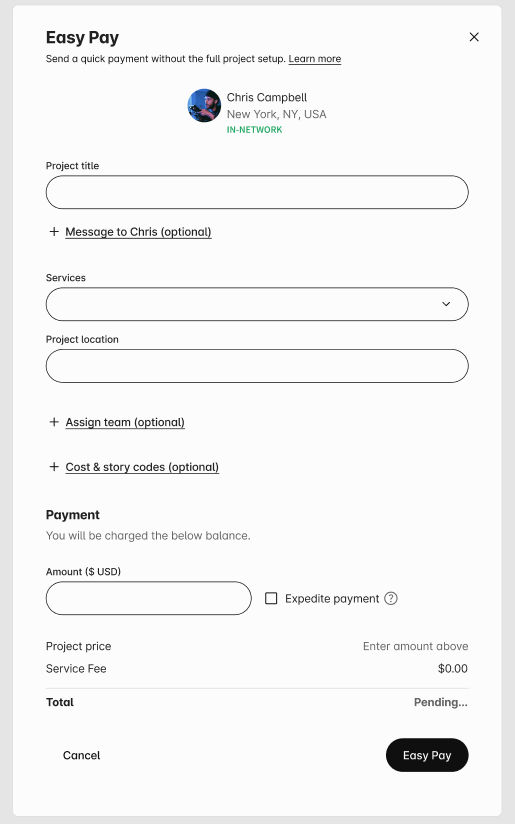
Once you have selected Easy Pay you will be met with a modal asking you for more information regarding your payment. Your Easy Pay will still be considered a "project" and will exist in your completed projects section (pictured above), so we'd recommend giving your payment a title you can easily identify. You will also be asked to indicate the services provided as well as the project's location.
Next, assign any relevant team and dictate what cost or story code should be attached to your Easy Pay (read more about our Teams feature HERE). You can also provide a message to your creator if you want to provide more context surrounding the payment.
Finally, type in the payment amount and whether or not you would like it to be expedited (which you can read more about HERE). Your total price will be calculated at the bottom of the page for you to review. Once you select the Easy Pay button, the project will be considered Complete and payment will be on its way! Remember, you can always revisit your completed projects to review your Easy Pay.
Your Easy Pay will be subject to your Net Terms in regards to timing unless you are paying with Credit or are choosing to expedite your payment. If you have any additional questions regarding our Easy Pay feature, please reach out to us at support@glimmer.io.